
Download StoryGenius – AI‑Powered Personalized Storybook Creator
Overview
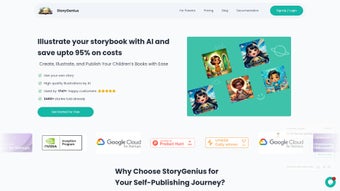
StoryGenius is a web‑based AI writing assistant that turns a child’s portrait into a fully illustrated, custom storybook. By uploading a single photograph and selecting a magical storyline, parents, teachers, or anyone who loves personalized storytelling can generate a unique narrative in just three clicks. The platform blends cutting‑edge machine‑learning models with a kid‑friendly interface, making the creation process feel like a playful adventure rather than a technical task.
Partnerships with industry leaders such as Google, Microsoft, and Nvidia lend credibility and ensure that the underlying AI remains both secure and constantly updated. Sample stories are readily available on the site, giving potential users a clear preview of the whimsical worlds they can craft for their loved ones. Whether you are looking for a birthday gift, a bedtime tale, or a keepsake for a family album, StoryGenius offers a fast, free‑to‑try solution that scales from a single story to an entire series, all without the need for design or writing expertise.
Core Features & Benefits
- AI‑Generated Illustrations: Advanced image synthesis creates vibrant, child‑centric artwork that matches the uploaded portrait.
- Multiple Storyline Templates: Choose from fantasy, adventure, sci‑fi, and classic fairy‑tale arcs, each adaptable to the child’s name and traits.
- One‑Click Publishing: Export the finished book as a high‑resolution PDF, e‑book, or printable format with a single button.
- Secure Cloud Processing: All photos are encrypted during upload and deleted after the story is generated, respecting privacy concerns.
- Cross‑Platform Accessibility: The web app works on any modern browser, eliminating the need for separate Windows, Mac, Android, or iOS installations.
- Collaborative Sharing: Generate shareable links so grandparents or teachers can view and comment on the story before printing.
- Free Starter Tier: Create up to three stories per month at no cost, with optional premium upgrades for unlimited books and higher‑resolution art.
Beyond the feature list, StoryGenius delivers tangible benefits: it saves hours that would otherwise be spent on drafting and illustrating, fosters a deeper emotional connection between child and narrative, and encourages literacy by presenting stories that feel tailor‑made. The AI learns from each interaction, meaning subsequent books become even more personalized, reflecting a child’s evolving interests and milestones. For educators, the tool doubles as a classroom resource, allowing teachers to craft custom reading material that aligns with curriculum themes while keeping students engaged.
Installation, Usage & Compatibility
Because StoryGenius is a cloud‑native web application, there is no traditional software download or installation process. Users simply navigate to storygenius.com on any device with an internet connection. The site automatically detects the browser capabilities and adjusts the interface for optimal performance.
Step‑by‑Step Guide
- Create an Account: Sign up with an email address or use a Google/Microsoft single sign‑on. Verification is instantaneous.
- Upload a Photo: Drag‑and‑drop the child’s portrait or select from a file picker. The system supports JPEG, PNG, and HEIC formats up to 10 MB.
- Select a Storyline: Browse the template gallery, preview sample pages, and click “Choose” on the preferred theme.
- Customize Details: Enter the child’s name, preferred pronouns, and any special traits (e.g., favorite animal) that the AI can weave into the narrative.
- Generate & Review: Click “Create Storybook.” Within 30–60 seconds, a preview appears. Users can edit text snippets or request a re‑render of the illustrations.
- Export or Share: Download the final PDF, send a shareable link, or order a printed hard copy directly through the integrated print‑on‑demand service.
StoryGenius runs on all major operating systems, including Windows 10/11, macOS 12+, Chrome OS, Android 8+, and iOS 13+. Because the heavy lifting is performed on remote servers, even low‑spec devices can generate high‑quality books without lag.
For users who prefer an offline experience, StoryGenius offers a lightweight desktop wrapper built with Electron, available for Windows and macOS. This wrapper simply launches the web app in a dedicated window and caches temporary assets for faster subsequent sessions, while still respecting the same privacy standards.
Pros, Cons, FAQ & Final Thoughts
Pros
- Intuitive three‑step workflow suitable for all ages.
- High‑quality AI illustrations that feel hand‑drawn.
- No software installation required; works in any browser.
- Strong privacy guarantees with automatic photo deletion.
- Free tier allows users to test the service without commitment.
Cons
- Premium features (unlimited stories, ultra‑HD art) require a subscription.
- Internet connection is mandatory; offline generation isn’t possible.
- Complex storylines may occasionally produce minor grammatical quirks, requiring manual correction.
Frequently Asked Questions
Is my child’s photo stored permanently?
No. All uploaded images are encrypted during processing and automatically deleted from our servers once the storybook is generated.
Can I use StoryGenius on a tablet?
Absolutely. The responsive web design works on iPad, Android tablets, and even smaller devices, though a larger screen makes editing easier.
What languages are supported?
StoryGenius currently supports English, Spanish, French, and German. Additional languages are in development for future releases.
Do I need a powerful computer to generate a book?
No. All AI rendering happens on cloud servers, so even older laptops or smartphones can create a story in under a minute.
How much does the premium subscription cost?
The premium plan is $9.99 per month or $99 per year, unlocking unlimited story generation, higher‑resolution art, and priority rendering.
Conclusion & Call to Action
StoryGenius stands out as a secure, creative, and user‑friendly platform for anyone who wants to turn a simple photograph into a treasured narrative. Its AI‑driven illustration engine, combined with a straightforward three‑step workflow, eliminates the steep learning curve associated with traditional book creation tools. While the free tier is generous enough for occasional use, the premium subscription offers excellent value for families, educators, or small businesses that produce stories regularly. Ready to see your child star in their very own adventure? Create your free account today and start generating magical storybooks in seconds.



.png)



